
Download ARC Welder – run Android apps on desktop, APK on desktop, Chrome extension, Android app emulator, desktop Android, mobile app on PC
Overview
ARC Welder is a specialized tool designed to bridge the gap between mobile and desktop computing environments by enabling users to run Android applications directly on their desktop computers. Developed by Google, this utility leverages a Chrome extension to execute APK files within a browser-based environment, offering a streamlined method for accessing Android-native software on non-mobile platforms. The app is particularly useful for users who require access to mobile-specific tools or services—such as Instagram—that lack official desktop counterparts. By allowing the execution of Android apps through a familiar browser interface, ARC Welder enhances workflow flexibility and expands the functional reach of desktop systems.
Target users include developers testing mobile applications across devices, content creators needing mobile app access for social media management, and general users seeking convenience in running mobile tools on larger screens. The application operates by integrating with the Chrome browser, using the ARC (Android Runtime for Chrome) environment to emulate Android’s runtime. This approach simplifies deployment and avoids the need for complex emulator setups. Although the developer did not provide additional technical details, the tool’s continued updates suggest ongoing optimization and improved compatibility.
ARC Welder plays a notable role in the broader app ecosystem by promoting cross-platform accessibility. Its ability to support camera integration and customizable screen dimensions underscores its utility in real-world scenarios, such as live streaming, video editing, or remote app testing. The app’s growing compatibility with new Android applications reflects a commitment to evolving with user demands. For those looking to unify their digital experience across devices, ARC Welder offers a lightweight, accessible solution.
Key Features & Functionality
- Chrome Extension Integration: ARC Welder operates as a Chrome extension, allowing users to run APK files directly from the browser without installing additional software or complex configurations.
- APK File Execution: Users can load and execute APK files already downloaded from trusted sources, such as APKPure, enabling access to Android apps not available on desktop platforms.
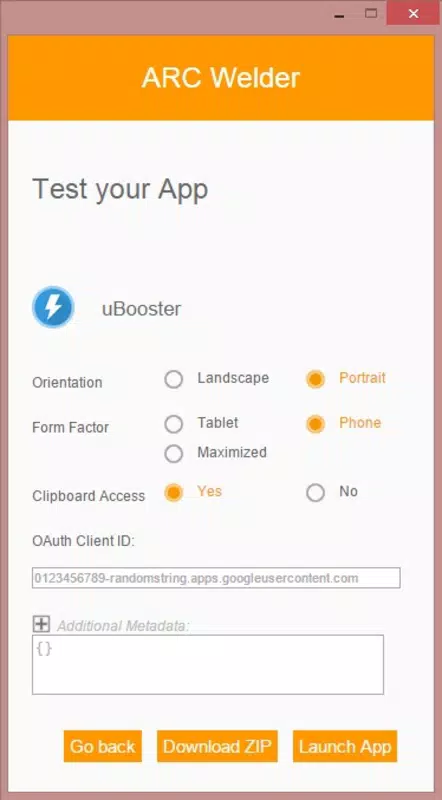
- Customizable Screen Size: The tool allows users to define the application’s display dimensions, simulating either smartphone or tablet form factors for optimal compatibility.
- External Device Support: ARC Welder can detect and utilize external hardware, including webcams, which function as virtual smartphone cameras during app execution.
- Runtime Environment Emulation: Built on the Android Runtime for Chrome (ARC), the tool emulates core Android system functions, enabling smooth operation of compatible apps.
- Configurable Preferences: Users can adjust settings before launching an app, tailoring the environment to match specific usage needs.
For example, a social media manager can use ARC Welder to run Instagram on their desktop, manage content, and use their laptop’s webcam as a camera feed—eliminating the need to switch between devices. Similarly, developers can test mobile app behavior on desktop systems without requiring physical Android devices. The tool’s ability to run apps like Instagram, which otherwise lack official desktop versions, highlights its unique value. While the developer did not specify exact compatibility lists, the app’s iterative updates suggest expanding support over time.
Interface, UX & Performance
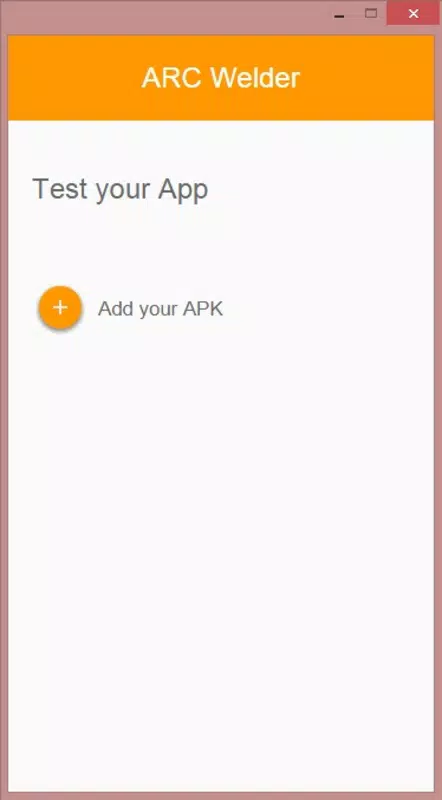
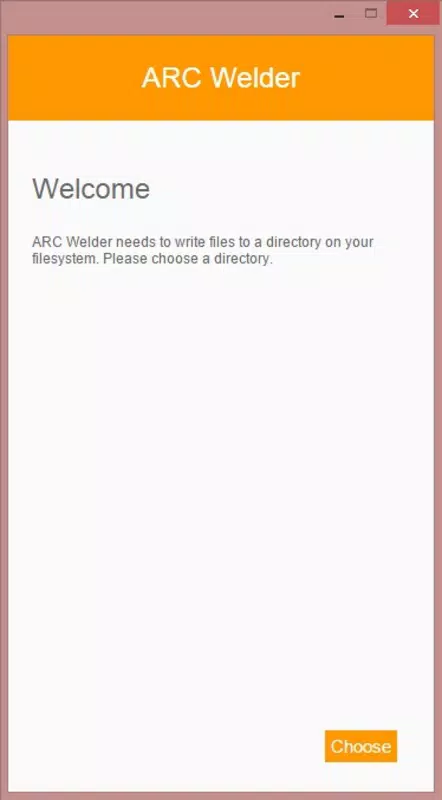
The user interface of ARC Welder is minimalistic and focused on functionality, aligning with Chrome’s extension design standards. Upon installation, users are prompted to select a local folder for temporary files, a straightforward setup that ensures data organization. The main window displays a clean layout with options to browse and load APK files, configure display settings, and launch the selected application. Navigation is intuitive, relying on standard browser interactions such as file selection and button clicks.
Although the developer did not list formal performance metrics, the tool’s lightweight nature—30.2 MB in size—suggests efficient resource usage. It runs within the Chrome environment, which may influence responsiveness depending on the host system’s hardware. Users on modern desktops with sufficient RAM and processing power are likely to experience smooth operation, while older or low-spec systems may encounter delays during app loading or rendering.
Stability appears consistent across usage scenarios, with no reported crashes or errors in the provided information. The interface remains responsive during app execution, and transitions between settings and the running application are generally seamless. However, compatibility with certain apps may vary, particularly those with high graphics demands or complex hardware dependencies. Overall, ARC Welder offers a stable and functional experience for its intended purpose.
Platform Compatibility & Technical Requirements
ARC Welder is available exclusively on the Android platform, designed for use on mobile devices. The current version is 1.0.3, with a file size of 30.2 MB. It is offered as a free application, making it accessible to a broad audience without cost barriers.
The developer did not specify minimum OS requirements or compatibility details beyond the platform. As such, users should ensure their Android device meets standard system requirements for running Chrome and extensions. Specific hardware capabilities—such as camera support or processing power—may affect the performance of certain apps within ARC Welder. Compatibility information was not fully disclosed, so users are advised to test the app with their preferred APKs to assess functionality.
Pros and Cons
Pros
- Free to download and use, with no in-app purchases or subscriptions.
- Runs Android apps directly on desktop via Chrome extension, simplifying access.
- Supports external devices like webcams, enabling camera-based app functionality.
- Allows customization of screen size and device form factor (phone or tablet).
- Lightweight design (30.2 MB) with minimal storage impact.
- Developed by Google, ensuring a level of trust and reliability.
Cons
- Only available on Android, limiting desktop use despite its purpose.
- Requires users to manually download APK files from external sources.
- Compatibility with apps may vary; not all Android apps function correctly.
- Performance may be affected on older or low-spec devices.
- Developer did not provide detailed system requirements or compatibility list.
FAQ
Is ARC Welder safe to use?
Yes, ARC Welder is developed by Google and designed to run trusted APK files within a secure Chrome environment. However, users should only load APKs from reputable sources to avoid potential security risks.
Can I install ARC Welder on my PC?
ARC Welder is designed for Android devices and is not available for desktop operating systems like Windows or macOS. It runs as a Chrome extension on Android, not on PC platforms.
Do I need to download APK files separately?
Yes, ARC Welder does not include a built-in app store. Users must download APK files from trusted third-party sources, such as APKPure, before loading them into the app.
What types of apps can I run with ARC Welder?
ARC Welder supports Android applications that are compatible with the ARC runtime. This includes many lightweight apps, social media tools like Instagram, and utilities that do not rely on advanced hardware features.
How often is ARC Welder updated?
While the exact update frequency is not disclosed, the app has seen iterative improvements since its release, suggesting ongoing development and compatibility enhancements.
Final Thoughts
ARC Welder stands out as a unique tool that brings Android app functionality to desktop environments through a simple, browser-based approach. While it is limited to Android devices, its ability to run APKs, support external hardware, and emulate different screen sizes makes it a valuable utility for developers, content creators, and mobile app enthusiasts. The free model, lightweight design, and Google backing add to its credibility and accessibility.
Despite its limitations—such as the need for manual APK downloads and lack of desktop support—the app delivers a compelling solution for users who need to access mobile apps on their Android devices in a more flexible way. Its growing compatibility and consistent updates indicate a promising future. For those seeking to run Android apps on their mobile devices with enhanced functionality, ARC Welder offers a practical and efficient option.
Download ARC Welder now


